
A few years ago, I became gradually obsessed with 4K DVDs for their picture and audio quality. I purchased a premium DVD player, and I started acquiring 4Ks in spades. The issue? I soon discovered that my TV at the time did not have the capacity for a 4K picture. I wasn’t able to experience the benefits of the technology I was investing in because of a technological disconnect.
The same thing is happening on construction projects, with much higher stakes than whether I’ll be able to watch Lord of the Rings: The Two Towers in the highest fidelity. Construction inspection teams will invest in software to streamline inspection, only to be forced to work around the limitations of those platforms.
When inspection systems cannot capture the exact data agencies need, teams often resort to parallel spreadsheets, handwritten notes, disconnected forms, or manual calculations to fill the gaps. While those workarounds may solve short-term problems, they also create inconsistent reporting, duplicate data entry, and disconnected project records.
As infrastructure projects become more data-driven and analytics demand greater accuracy, agencies need configurable construction management software that adapts to their workflows, not the other way around.
The Challenge with Inflexible Inspection Software
No two agencies manage inspections exactly the same way. Different project types, specifications, reporting requirements, and approval processes all create unique field documentation needs. Yet many inspection platforms only support a limited set of predefined forms and data fields.
This often forces inspectors and project teams to work outside the system to capture critical information, such as:
- Material tracking data
- Quality assurance documentation
- Environmental compliance records
- Quantity calculations
- Project-specific inspection notes
- Agency-specific reporting requirements
The result is fragmented field data collection that becomes harder to standardize, review, and report on downstream. For agencies looking to modernize inspection operations, flexibility matters just as much as digitization. That’s why Appia now includes Custom Fields and Custom Worksheets; new capabilities designed to give agencies greater flexibility in how inspection data is collected, standardized, and reported.
New in Appia: Custom Fields
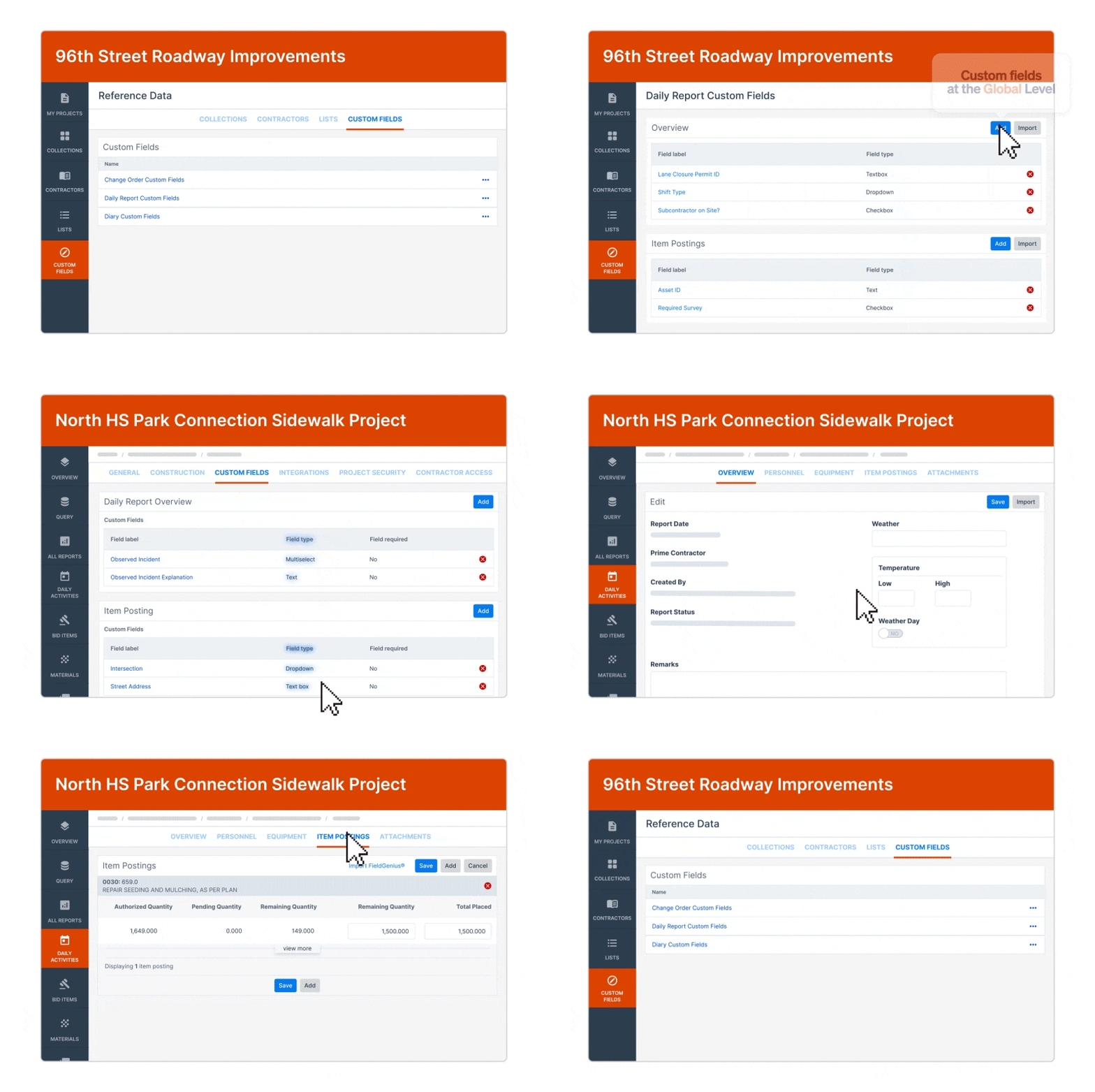
Appia’s new Custom Fields functionality expands the ways agencies can configure field data collection in Daily Report Overviews, Item Postings, Change Order Overviews, and Diaries.
Previously, Appia supported only text areas. With this release, agencies now have access to four additional configurable field types:
- Checkbox
- Multiselect
- Text Box
- Dropdown List
These new field types allow agencies to move beyond unstructured notes and capture more consistent, reportable inspection data.
Introducing Custom Worksheets
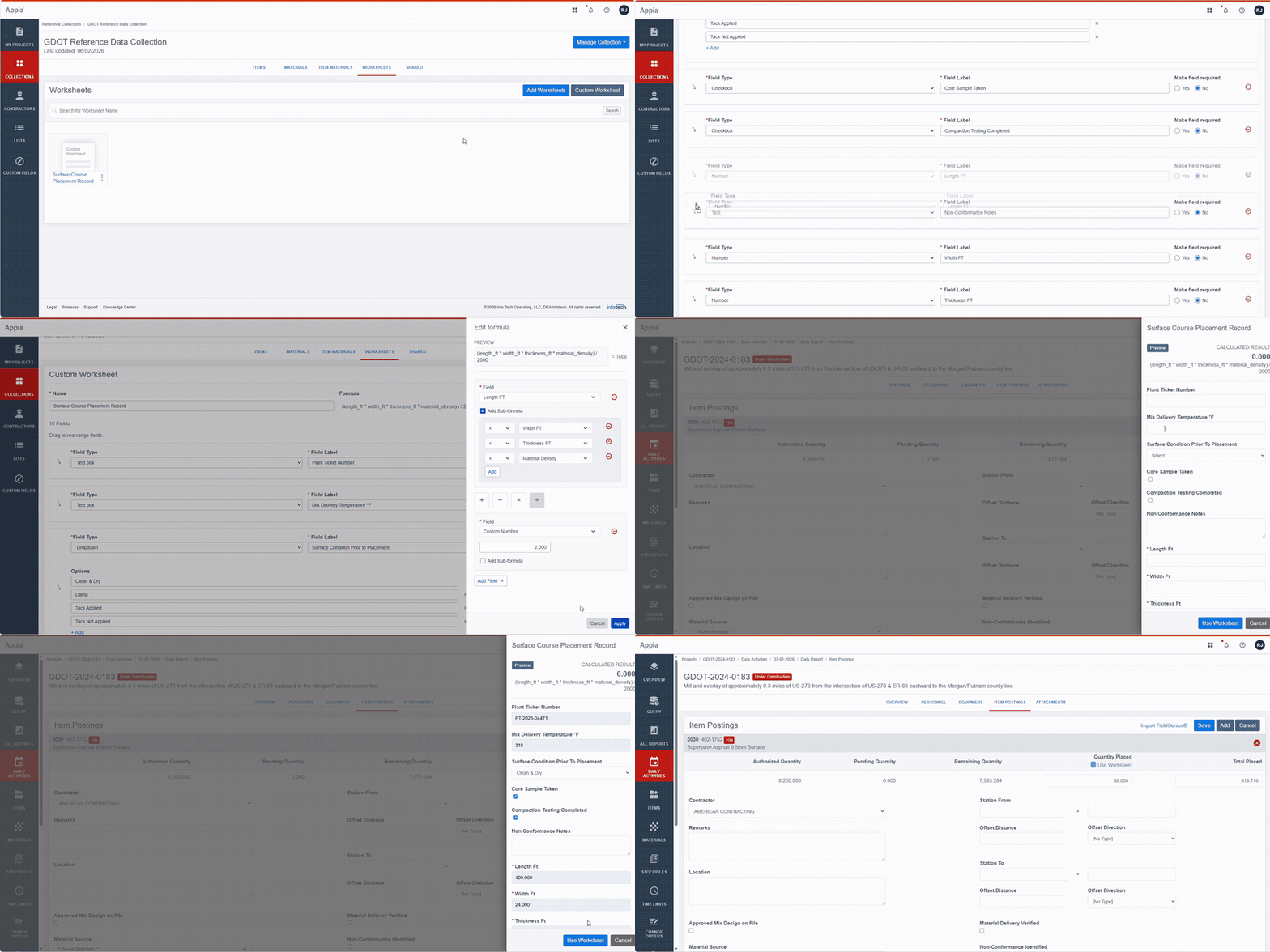
In addition to configurable fields, Appia now supports fully customizable inspection worksheets. Previously, users were limited to a fixed library of pre-built worksheets. With Custom Worksheets, agencies can now build their own worksheets from scratch using a flexible configuration interface. This gives teams the ability to create inspection worksheets tailored to their exact workflows, calculations, and documentation requirements. Worksheets are associated with an item and are completed when the item is posted to a daily report.
Custom Worksheets support a wide range of inspection and documentation workflows, including:
Quantity Calculations
- Earthwork quantities
- Aggregate and HMA placement
- Surface treatment calculations
- Board foot calculations for lumber items
Material Tracking
- Test results
- Batch tracking information
- Mix design documentation
- Installation verification details
Compliance Documentation
- Specification compliance
- Environmental inspections
- Quality acceptance workflows
- Corrective actions and deficiencies
Because worksheets can include calculations, validation, and configurable fields, inspectors can complete more of their documentation directly inside Appia instead of relying on external spreadsheets. Combined with Custom Fields, these capabilities create cleaner reporting, more consistent documentation, and a more connected field data collection process.
Getting Started With a More Flexible Approach to Construction Inspection
Custom Fields and Custom Worksheets are now available in Appia. Users can begin configuring fields and building worksheets directly within the platform to support their inspection and reporting requirements. To learn more and see these features first-hand, check out this self-guided simulation:
Author

Nate Binder
Digital Marketing Manager
A proud graduate of Florida State University, Nate works with subject matter experts and sales professionals to produce targeted marketing collateral.